
Progress claims that take minutes, not evenings
Build payment applications from the task-level percentages your team already recorded — with retention, previous claims and change orders handled automatically.
- Faster claim cycles
- Fewer disputes
- Healthier cash flow
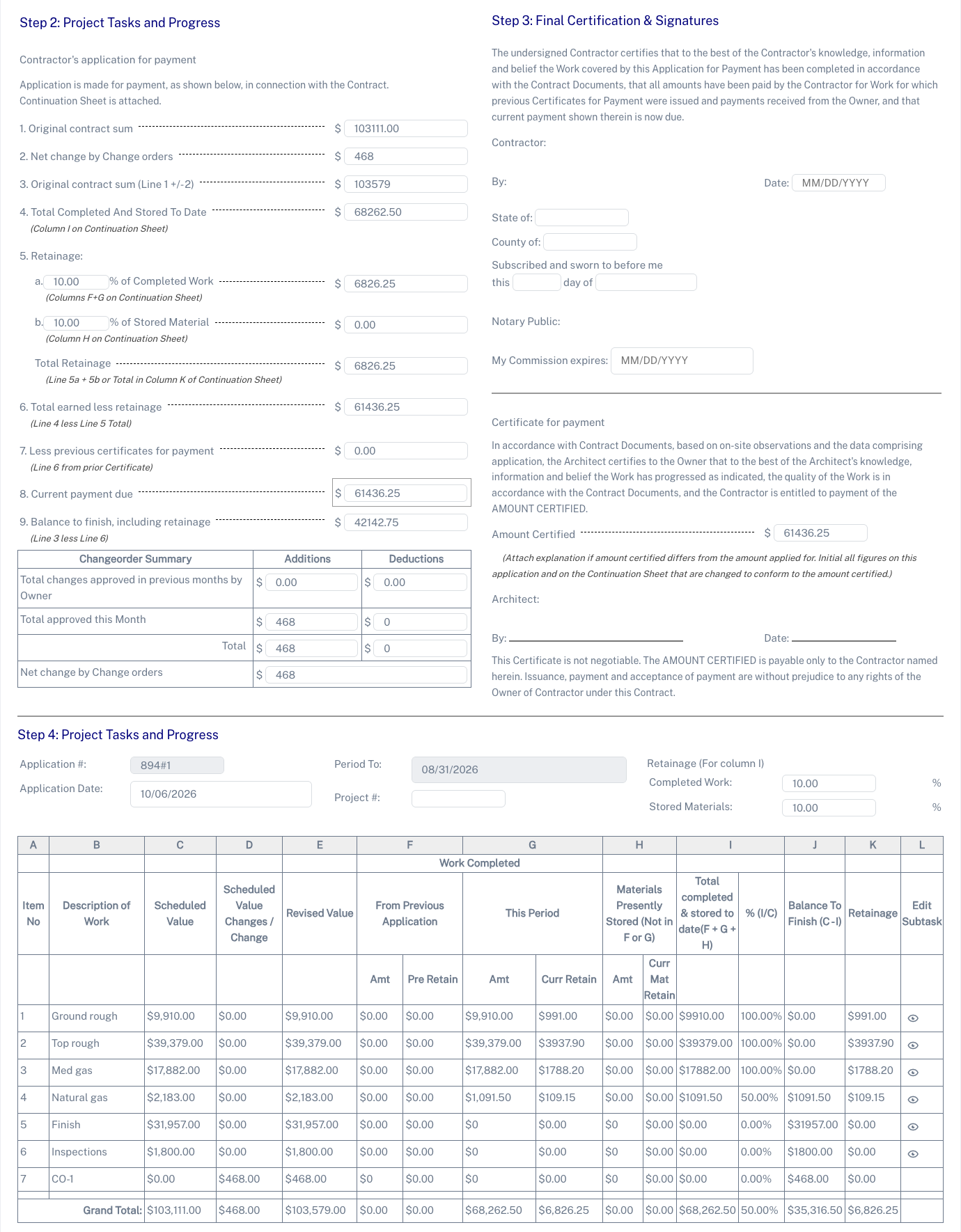
Payment applications tied straight to the job
Generate industry standard payment applications from the job record without re-entering contract sums, change orders or retainage.
Previous periods, lien waivers and continuation sheets are all visible on the same screen, so billing stays accurate and auditable.
- Automatic, professional progress billing forms
- Stored materials, change orders and retainage tracked by period
- Lien waiver templates included
- Previous periods and waivers attached to the job
What it changes for the business
The operational and financial difference contractors see once this is running.
Faster claim cycles
Build period claims from recorded task progress, previous billing and retainage instead of rebuilding the figures in a separate spreadsheet.
Fewer disputes
Consistent claim documents show completed work, stored materials and approved changes, giving reviewers a clear basis for checking the amount requested.
Healthier cash flow
Keep progress billing tied to recorded work so your team can submit claims on schedule rather than waiting to assemble supporting figures.
Inside Commercial Payment Applications
The parts of this module your team will touch every single day.
Schedule of values
Task-level breakdowns that match the contract and the job.
Automatic maths
Previous claims, this claim, retention and balance calculated for you.
Audit-ready output
Consistent, professional claim documents every period.
Where this fits in the job lifecycle
Information moves in one direction — forward — with no re-entry between stages.
- Step 1
Customer
Request captured
- Step 2
Estimate
Scope and price
- Step 3
Job
Scheduled and dispatched
- Step 4
Commercial Payment Applications
Where this feature works
- Step 5
Invoice
Billed from real data
- Step 6
Reporting
Margin visible
Frequently asked questions
Still unsure? A 30-minute demo answers most of it.
Run Commercial Payment Applications on your next job.
Book a live demo with someone with someone who has actually run jobs.